







Menu
Your Cart

Waveshare 10.1 inch HDMI IPS-TFT-LCD Display 1024*600 pixels with Touchscreen - Raspberry Pi Compatible

Waveshare 10.1 inch HDMI IPS-TFT-LCD Display 1024*600 pixels with Touchscreen - Raspberry Pi Compatible
  • Availability: Directly available from warehouse in Eindhoven
  • SKU: 005018
€82.00
Ex Tax: €67.77

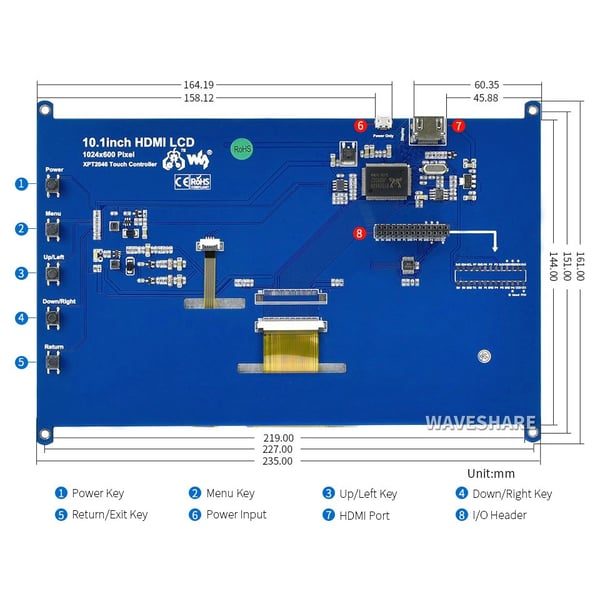
This Waveshare display with touchscreen is connected via HDMI and the GPIO pins of a Raspberry Pi.

See the following page for more information: Wiki

Please login or register to review

Specifications

General
Brand Waveshare
Manufacturer model/SKU 11870
Features Display
Touchscreen
General physical appearance
Main color Blue
Weight [g] 500
Dimension X [mm] 235
Dimension Y [mm] 161
Mounting options Mounting hole(s)
Form factor Module (general)
Raspberry Pi SBC layout/HAT
General electrical properties
Minimum supply voltage [V DC] 5
Maximum supply voltage [V DC] 5
Minimum IO-pin input voltage [V] 3.3
Maximum IO-pin input voltage [V] 3.3
IO-pin output voltage [V] 3.3
Communication
Hardware interface(s) SPI
HDMI
Display
Type IPS
Screen diagonal [inch] 10.1
Number of pixels long side 1024
Number of pixels short side 600
Display shape Rectangular
Pixel colors RGB
Maximum viewing angle [°] 170
Touchscreen
Touchscreen controller ADS7846
Touch type Resistive
Multi-touch support No
Connectors
Power supply connector(s) Micro USB female
IO-connector(s) HDMI female
Pin header female (2.54mm)
Package contents
Package contents 1x Display module
1x Micro HDMI adapter piece
1x HDMI adapter piece
4x Spacer
4x Bolt
1x Touch pen

If you have a question or problem regarding a product, please contact us by using one of the buttons below.

1
false
true
true
Remove
Change
tr